A plain QR code works, but it doesn't always look great on a business card, product package, menu, or marketing poster. If you're using QR codes to represent your brand, adding a logo and a little customization can make the code feel more professional and easier to recognize.
A free QR code generator with logo lets you create a QR code and customize it with your brand logo, colors, and design. You can use it to connect customers to your website, WhatsApp, social profiles, payment page, digital menu, or other online destinations.
For example, a local restaurant could put a branded QR code on every table. A customer scans it and immediately opens the menu. A photographer could put another QR code on a business card that opens their portfolio and WhatsApp contact.
The idea is simple: make the offline-to-online journey easier.
What Is a Free QR Code Generator with Logo?
A QR code generator with logo is an online tool that creates a scannable QR code and allows you to add a logo or other branding elements.
Instead of using the same black-and-white QR code everyone has seen, you can create something that looks more connected to your business.
Depending on the generator, you may be able to create QR codes for:
- Websites and URLs
- WhatsApp chats
- Social media profiles
- Wi-Fi details
- Contact information
- Digital business cards
- Payment links
- Restaurant menus
- Event information
For example, a clothing store could create a QR code with its logo that opens its online store. Customers can scan it from packaging, a poster, or a business card without manually typing a long URL.
Why Add a Logo to Your QR Code?
A logo isn't required for a QR code to work. The main benefit is branding and presentation.
1. Make Your Brand Recognizable
Imagine you receive two QR codes on a flyer. One is a basic black square, while the other includes the company's logo and brand colors.
The branded version immediately tells you who it belongs to.
For businesses that use QR codes frequently, this can create a more consistent visual identity across marketing materials.
2. Create a More Professional Look
QR codes are often printed on:
- Business cards
- Product packaging
- Flyers
- Posters
- Menus
- Brochures
- Event materials
A customized QR code can fit naturally into the design instead of looking like something added at the last minute.
3. Make Offline Marketing More Interactive
A printed advertisement cannot directly open a website.
A QR code can.
For example, a real estate company could place a QR code on a property brochure with the message:
Scan to view photos, pricing and location
The customer scans it and is taken directly to the property page.
That's a simple way to connect printed marketing with your website.
4. Help Customers Take Action Faster
People don't always want to type URLs manually.
A QR code can take them directly to the destination you want them to visit.
For example:
Restaurant: Scan → View Menu
Salon: Scan → Book Appointment
Photographer: Scan → View Portfolio
Shop: Scan → Visit Online Store
Business: Scan → WhatsApp Us
The fewer steps a customer has to take, the easier the experience becomes.
What Should You Look for in a QR Code Generator with Logo?
Not every QR code generator offers the same features.
If you're choosing a tool, look for features that actually fit your needs.
Logo Upload
You should be able to upload your company logo or brand mark and place it inside the QR code without making the code difficult to scan.
Custom Colors
Brand colors can make the QR code match your marketing design. However, contrast is more important than simply making the QR code colorful.
High-Quality Downloads
If you plan to print the QR code, look for high-resolution formats. PNG works well for many digital uses, while SVG can be useful for larger print designs.
QR Code Preview
A preview helps you see how the final code will look before downloading it.
Dynamic QR Codes
If your use case requires updating the destination later or tracking scans, a dynamic QR code can be more useful than a static QR code.
Mobile-Friendly Creation
You should be able to create and download the QR code without struggling with a complicated interface.
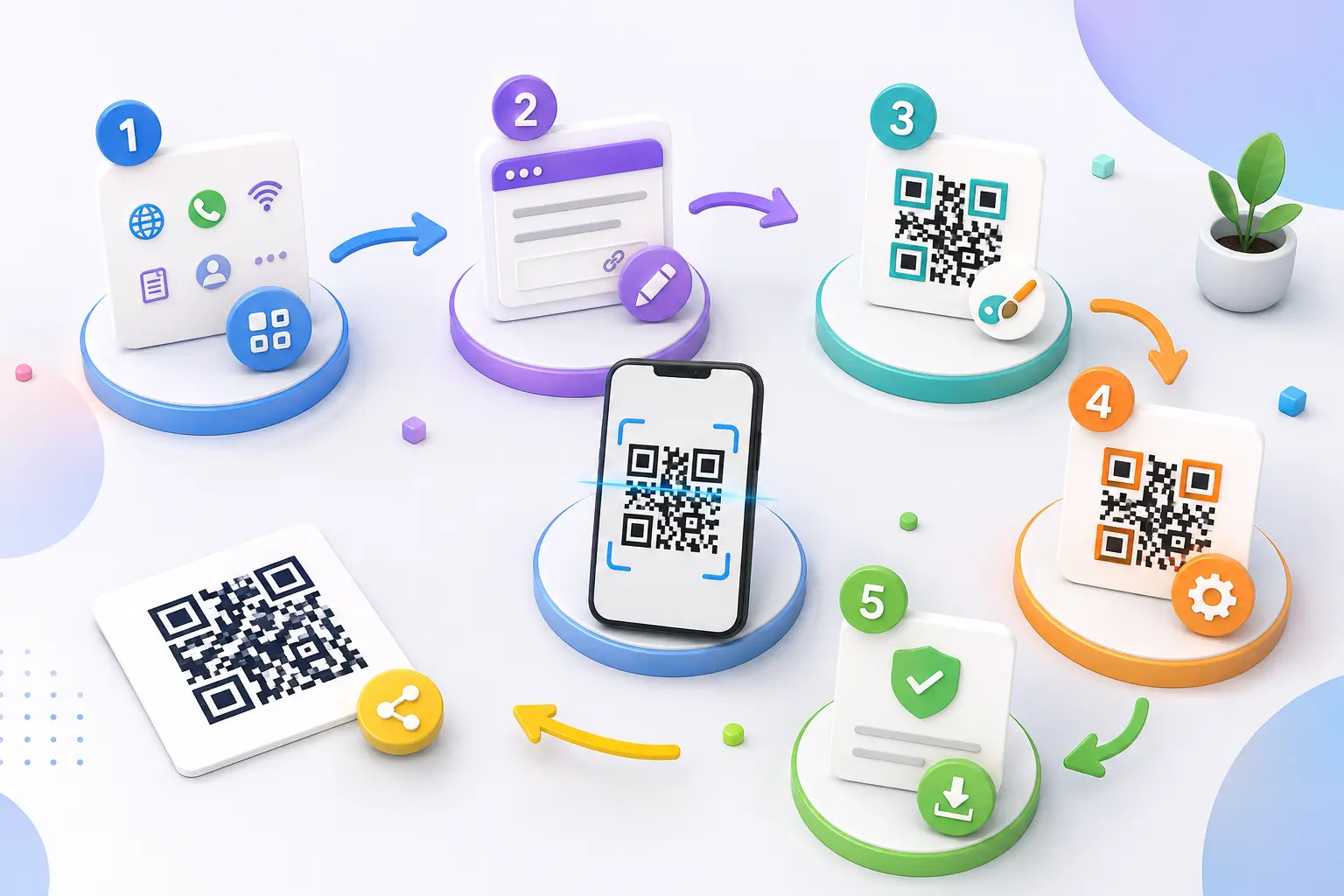
How to Create a Free QR Code with a Logo
Creating a branded QR code doesn't need to be complicated.
Step 1: Choose Your QR Code Type
First, decide what you want the QR code to do.
For example:
- Open a website
- Start a WhatsApp conversation
- Share contact details
- Connect to Wi-Fi
- Open a social profile
Step 2: Add Your Information
Enter the URL, phone number, message, or other information required by the QR code type.
Step 3: Upload Your Logo
Add your business logo or brand image.
Try to use a clear image that works well at small sizes.
Step 4: Customize the Design
You can adjust colors, shapes, frames, or other available design options.
Don't make the design too complicated. A QR code still needs to scan reliably.
Step 5: Generate and Test It
Generate the QR code and scan it using more than one smartphone if possible.
Check that it opens the correct destination.
Step 6: Download and Use It
Once you're satisfied with the result, download the QR code and add it to your business cards, packaging, website, posters, menus, or other marketing materials.
A Real-World Example
Let's say Rahul runs a small coffee shop.
He wants customers to:
- View the menu
- Order online
- Follow the Instagram page
- Contact the shop on WhatsApp
Instead of printing four different URLs, Rahul creates a branded QR code.
He places the QR code on each table with the text:
Scan to View Our Menu & Order
The customer scans it and reaches a simple page containing:
View Menu
Order Online
WhatsApp Us
Follow on Instagram
Now one QR code handles several customer actions.
This is where combining QR codes with smart links can be particularly useful for small businesses.
Best Uses for Branded QR Codes
A customized QR code can be useful in many everyday situations.
Business Cards
Add a QR code that opens your website, portfolio, contact details, or WhatsApp.
Product Packaging
Send customers to product information, instructions, reviews, offers, or your online store.
Restaurants and Cafés
Use QR codes for digital menus, ordering, reservations, reviews, and social media.
Events
Share event schedules, registration forms, maps, tickets, or event galleries.
Retail Stores
Connect customers to product pages, discount offers, loyalty programs, or online shopping.
Marketing Materials
Use QR codes on brochures, banners, posters, newspapers, and flyers to drive visitors to a specific online destination.
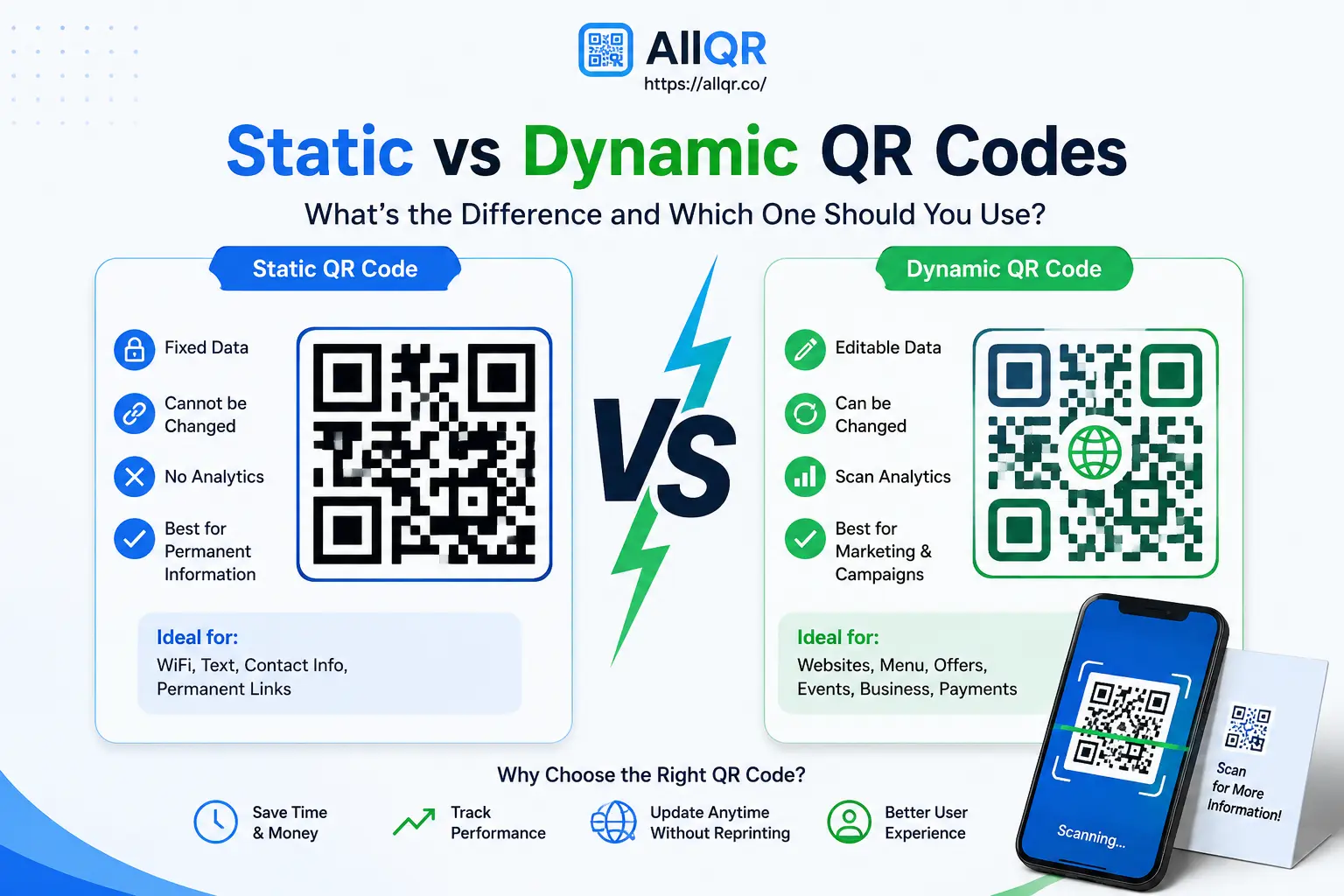
Static vs Dynamic QR Codes
Before creating a QR code, it's useful to understand the difference.
Static QR Code
The information is stored directly in the QR code.
For example, a static QR code could contain a fixed website URL.
Good for:
- Permanent information
- Basic contact details
- Wi-Fi information
- Simple URLs
Dynamic QR Code
A dynamic QR code can point to a destination that can be managed or changed later, depending on the service you're using.
It can also provide useful scan analytics when supported by the platform.
Good for:
- Marketing campaigns
- Business promotions
- Events
- Product campaigns
- Tracking engagement
For example, suppose you print 5,000 brochures with a QR code. Later, you want the QR code to open a different landing page.
A suitable dynamic QR setup can make that change possible without reprinting the brochures.
Tips for Creating a QR Code That Actually Works
A beautiful QR code is useless if people can't scan it.
Keep these practical tips in mind:
Use Good Contrast
Make sure the QR pattern clearly stands out from the background.
Don't Make the Logo Too Large
A logo can improve branding, but covering too much of the QR pattern can affect scanning.
Keep Enough White Space
The blank area around the QR code, often called the quiet zone, helps scanners recognize the code.
Test Before Printing
Always scan the final QR code before sending a design to the printer.
Consider the Size
A QR code printed on a large poster and one printed on a small business card may need different sizing.
Use a Clear Call to Action
Instead of showing only a QR code, add useful text such as:
Scan to View Menu
or
Scan to Chat on WhatsApp
People are more likely to understand what will happen after scanning.
Can QR Codes Help With SEO?
QR codes are not a direct Google ranking factor.
However, they can support your broader digital marketing strategy by making it easier for offline audiences to reach your website or landing pages.
For example, a business could use a QR code on printed advertising to send people to a useful landing page.
That can help connect:
Offline promotion → Website → Content → Customer action
Just remember that QR codes themselves don't automatically improve search rankings. Your website still needs useful content, good technical SEO, strong user experience, and relevant authority.
Who Can Benefit From a Free QR Code Generator with Logo?
A branded QR code can be useful for:
- Small business owners
- Freelancers
- Restaurants
- Retail stores
- Photographers
- Event organizers
- Marketing agencies
- E-commerce brands
- Creators
- Consultants
- Local businesses
- Startups
You don't need to be a large company to use one.
Even a freelancer with a business card can use a QR code to connect potential clients to a portfolio and contact page.
Frequently Asked Questions
Is a QR code with a logo still scannable?
Yes, provided the QR code is designed correctly. Keep sufficient contrast, maintain the quiet zone, and avoid covering too much of the QR pattern with the logo.
1.Can I create a QR code with my company logo for free?
Yes, some QR code generators offer free logo customization. The available features, download formats, and usage limits depend on the platform.
2.Can I use a branded QR code on a business card?
Absolutely. A QR code on a business card can link to your website, portfolio, WhatsApp, contact information, or social profiles.
3.Can I create a QR code for WhatsApp?
Yes. A QR code can be created to open a WhatsApp conversation or a WhatsApp-related landing page, depending on the QR tool you use.
4.Can I use a QR code for a restaurant menu?
Yes. Restaurants commonly use QR codes to connect customers to digital menus, ordering pages, reservations, reviews, and other information.
5.Should I test a QR code before printing?
Yes. Always test it on multiple phones and from a realistic scanning distance before printing large quantities.
6.What's the difference between a static and dynamic QR code?
A static QR code generally contains fixed information, while a dynamic QR code can be managed through a service and may allow destination changes and scan analytics.
7.Can a QR code improve my Google rankings?
Not directly. QR codes aren't a direct ranking factor. They can, however, make offline campaigns more effective by helping people reach your website and digital content.
Conclusion
A free QR code generator with logo can be a simple way to make QR-based marketing more useful and more consistent with your brand.
Whether you're putting a QR code on a business card, restaurant menu, product package, event poster, or marketing campaign, the goal should always be the same: make it easy for people to take the next step.
Add your logo, keep the design readable, test the code before publishing, and send visitors to a useful destination.
With AllQR, you can create branded QR codes for different types of digital sharing and connect offline audiences with your online presence.
A good QR code doesn't need to be complicated. It just needs to look trustworthy, scan reliably, and take people exactly where they expect to go.