Need to turn a website link, WhatsApp number, Wi-Fi details, or business information into a QR code? A free QR code generator makes it possible in just a few steps.
Instead of asking customers to type a long URL or search for your business online, you can give them a simple QR code to scan with their phone.
For example, a restaurant can place a QR code on a table that opens its digital menu. A local business can put one on a business card that opens WhatsApp. An online seller can add a QR code to product packaging and send customers to a review page.
The important thing is choosing the right type of QR code and testing it before sharing or printing it.
What Is a Free QR Code Generator?
A free QR code generator is an online tool that converts information into a scannable QR code.
Depending on the tool, you can create QR codes for:
- Websites and landing pages
- WhatsApp conversations
- Wi-Fi access
- Contact information
- Social media profiles
- Text
- Locations
- Digital menus
- Payment pages
Once someone scans the code using their smartphone camera, the relevant information or destination opens on their device.
A simple example
Imagine you own a salon.
Instead of printing:
Website: example.com
WhatsApp: +91 XXXXX XXXXX
Instagram: @example
you can place one QR code on your visiting card.
A customer scans it and can quickly reach your website, WhatsApp, or other important links.
That small change can make offline marketing much easier to use.
How Does a QR Code Work?
A QR code stores information in a pattern of black-and-white or customized modules.
When a smartphone camera recognizes the pattern, it reads the encoded information and performs the relevant action.
For a URL QR code, the process looks like this:
Scan QR → Read encoded URL → Open webpage
For a WhatsApp QR code:
Scan QR → Open WhatsApp → Start conversation
For a Wi-Fi QR code:
Scan QR → Read network details → Connect to Wi-Fi
The experience is simple for the customer because they don't have to manually type the information.
Static vs Dynamic QR Codes: What's the Difference?
This is one of the most important things to understand before creating a QR code.
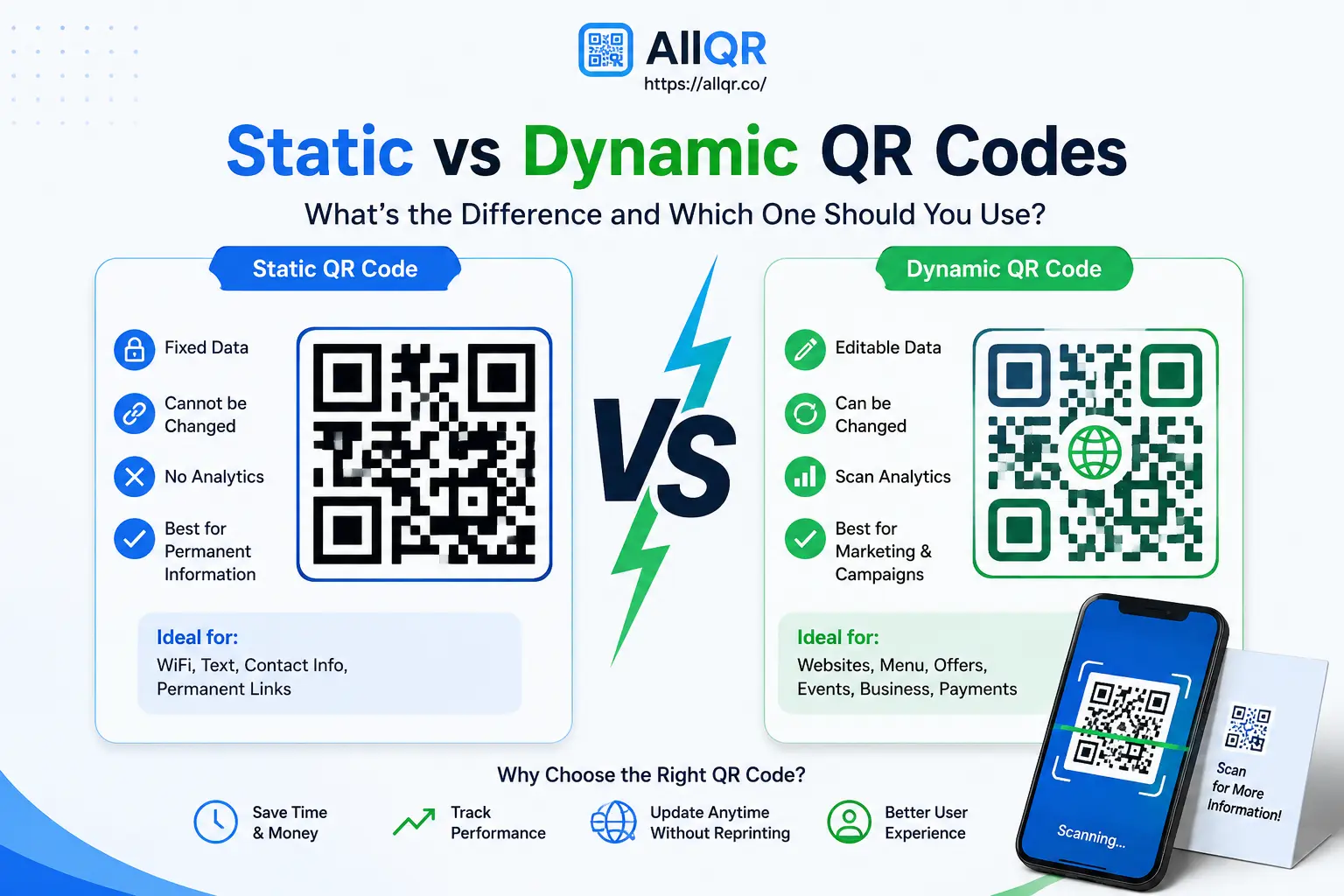
Static QR Code
A static QR code contains the information directly.
It's useful when the information is unlikely to change.
Example:
You create a QR code for your permanent business website and print it on a business card.
Dynamic QR Code
A dynamic QR code generally points to a changeable destination managed through a QR service.
Depending on the platform, this can allow you to:
- Change the destination later
- Track scans
- Review campaign performance
- Manage multiple QR campaigns
Example:
A restaurant prints one QR code on its tables. During different months, the destination can be updated from a regular menu to a seasonal menu or promotional page without replacing the physical QR code, when the service supports this functionality.
Which one should you choose?
| Requirement | Better option |
|---|---|
| Permanent website URL | Static |
| Business card | Static or Dynamic |
| Marketing campaign | Dynamic |
| Changing destination | Dynamic |
| Scan analytics | Dynamic |
| Simple personal use | Static |
Don't choose a dynamic QR code simply because it sounds more advanced. If you only need a permanent URL, a basic QR code may be all you need.
Why Do Businesses Use QR Codes?
QR codes are particularly useful when customers are moving between the offline and online worlds.
1. Business Cards
Add a QR code that opens your website, contact details, or WhatsApp.
A potential customer can scan it instead of typing your number manually.
2. Restaurants and Cafes
QR codes can be used for:
- Digital menus
- Online ordering
- Feedback forms
- Offers
- Restaurant websites
Example:
A café places a small “Scan to View Menu” QR code on every table. Customers can open the menu immediately from their phones.
3. Product Packaging
An e-commerce brand can use QR codes to connect customers with:
- Product instructions
- Warranty registration
- Reviews
- Support
- Promotional offers
4. Events
Event organizers can use QR codes for registration pages, schedules, venue information, or digital tickets.
5. Local Businesses
A QR code on a storefront, flyer, or poster can take people directly to a website, contact page, WhatsApp chat, or location.
What Makes a Good QR Code Generator?
Not every free QR code tool provides the same experience.
Before choosing one, check the following:
Multiple QR Code Types
A useful generator should support the type of information you actually need.
Customization
For business use, options such as logos, colors, frames, and call-to-action text can help match your brand.
But don't over-design the code. A QR code still needs to scan reliably.
High-Quality Downloads
If you plan to print the QR code, make sure the downloaded image is clear enough for its intended size.
Easy Testing
You should be able to generate the code and test it before using it publicly.
Dynamic Features
If you're running marketing campaigns, dynamic QR functionality and scan analytics can be useful.
Clear Pricing
“Free” should be easy to understand. Check whether the service has limits, expiration periods, watermarks, or paid features.
How to Create a QR Code Online for Free
Creating a QR code doesn't need to be complicated.
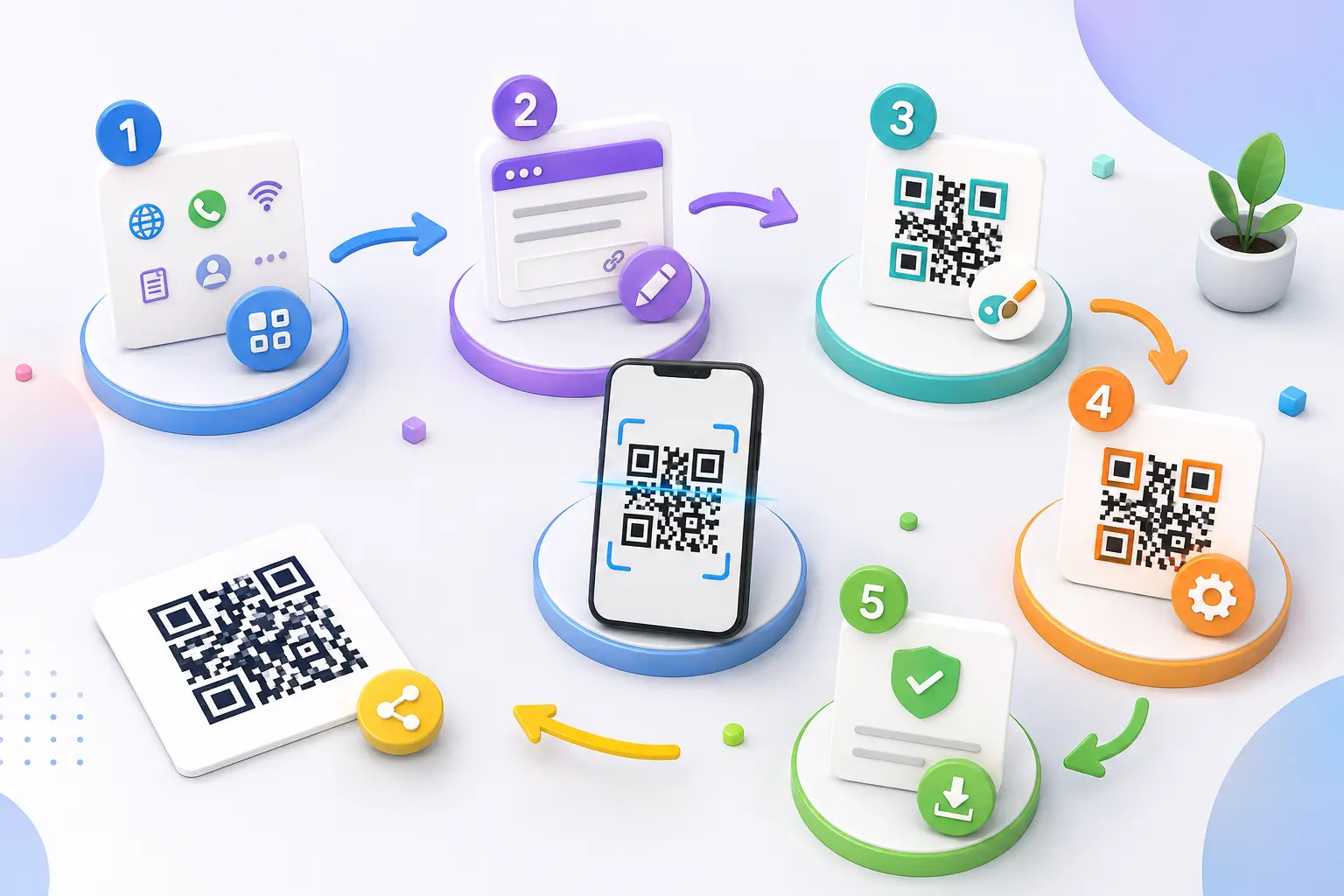
With AllQR, the basic process is:
- Choose the QR code type
- Enter your information or URL
- Customize the design if required
- Generate the QR code
- Scan and test it
- Download and share it
You can use AllQR's QR Code Generator to create QR codes for different use cases.
Practical example
Suppose you're a photographer and want more people to contact you after receiving your business card.
You could create a QR code that opens your portfolio or contact page.
The printed card could simply say:
Scan to View My Portfolio
The customer scans it and reaches your online portfolio without typing the URL.
How to Make Your QR Code Easy to Scan
A QR code doesn't need an elaborate design to look professional.
Follow these simple practices:
- Use good contrast between the code and background.
- Keep enough clear space around the QR code.
- Don't make the logo excessively large.
- Avoid placing it on a busy image.
- Test it on multiple smartphones.
- Make the printed QR code large enough for the scanning distance.
- Add a clear instruction such as “Scan to View Menu.”
One practical tip
Always test the printed version, not just the image on your computer.
A QR code that works perfectly on a large monitor may become difficult to scan when printed very small on a business card.
Can a QR Code Help With Marketing?
Yes, but it's important to understand how.
A QR code itself doesn't magically improve SEO or rankings.
Its value is in making it easier for people to move from an offline interaction to an online destination.
For example:
Poster → QR scan → Landing page → Product information → Purchase
or:
Business card → QR scan → Website → WhatsApp → Enquiry
This can make campaigns easier for customers to use and easier for businesses to manage.
If you're using dynamic QR codes with analytics, you may also be able to understand which campaigns generate scans, depending on the features provided by the platform.
QR Code Mistakes to Avoid
A few simple mistakes can make an otherwise good QR campaign ineffective.
Don't link to the wrong page
Always check the destination before publishing.
Don't make the QR code too small
The correct size depends on the scanning distance and print quality.
Don't sacrifice readability for design
A beautiful QR code is useless if customers can't scan it.
Don't forget mobile users
The page opened after scanning should work properly on smartphones.
Don't print without testing
Scan it from the actual location where customers will use it.
Frequently Asked Questions
Is a free QR code generator really free?
Some QR code generators offer free creation and downloads, while others reserve features such as dynamic QR codes, analytics, or advanced customization for paid plans. Always check the specific tool's limitations.
Can I create a QR code for my website?
Yes. Enter your website URL into a QR code generator and create a code that opens the page when scanned.
Can I create a WhatsApp QR code?
Yes. A WhatsApp QR code can take customers directly to a WhatsApp conversation, making it useful for customer support, enquiries, and business communication.
Can I add a logo to a QR code?
Many modern QR generators support logo and design customization. Keep the logo reasonably sized and test the final code before publishing.
What's the difference between static and dynamic QR codes?
A static QR code generally contains fixed information, while a dynamic QR solution can allow the destination to be changed later and may provide scan analytics, depending on the service.
Where can I use a QR code?
You can use QR codes on business cards, menus, posters, packaging, flyers, event materials, product labels, websites, storefronts, and many other physical or digital touchpoints.
Do QR codes work on iPhone and Android?
Modern smartphones generally support QR scanning through the camera or built-in scanning functionality. The exact experience can vary by device and operating system.
Conclusion
A free QR code generator can turn a simple URL or piece of information into a much easier way for customers to connect with your business.
The best QR code isn't necessarily the one with the most design options. It's the one that works reliably, takes users to the right destination, and makes the next step obvious.
Whether you're sharing a website, WhatsApp chat, digital menu, contact information, or marketing campaign, start with a clear purpose, create the right QR type, and test it before putting it in front of customers.
With AllQR, you can create QR codes online and use them across your digital and offline marketing.
Start with one useful QR code, test how people use it, and then build from there.