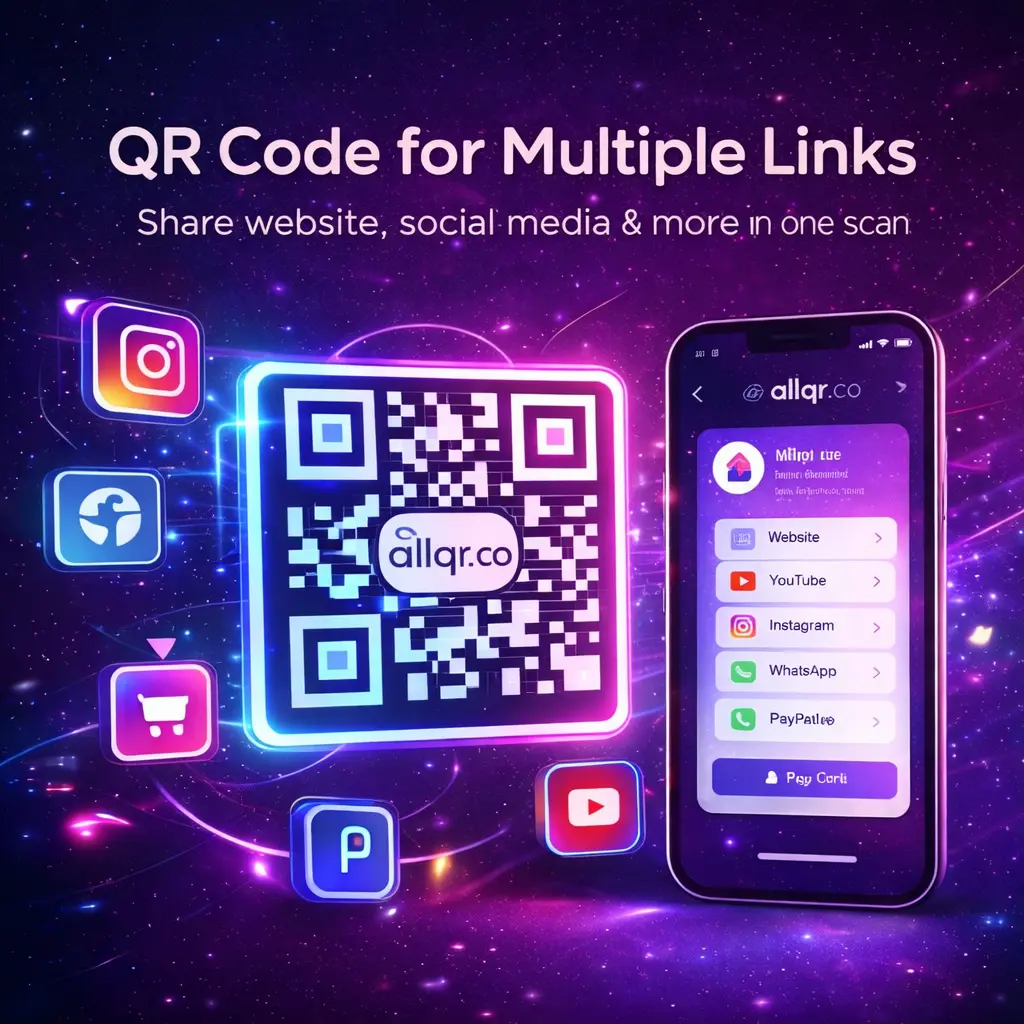
Sharing several links should not mean sending five different URLs and hoping people open all of them. A QR code for multiple links gives users one simple code to scan, then directs them to a page where they can choose the website, social profile, WhatsApp chat, payment option, or other destination they need.
This approach is useful for businesses, creators, restaurants, events, professionals, and marketers who need to connect offline materials with several online destinations. It also makes printed marketing materials easier to manage because one QR code can represent an entire digital presence. In this guide, we’ll explain how multi-link QR codes work, where they are useful, how dynamic QR codes make updates easier, and what to check before creating one.
What Is a QR Code for Multiple Links?
A QR code for multiple links is a QR code that opens a landing page containing several clickable destinations. Instead of encoding one website address directly into the QR code, the code points to a page where users can choose from multiple links.
For example, a business could create one QR code that provides access to:
- Official website
- Instagram profile
- YouTube channel
- Online store
- Payment page
- Contact information
- Location or directions
The QR itself remains simple. The useful part is the landing page behind it.
This is different from creating several separate QR codes for every destination. A single multi-link QR can reduce visual clutter on business cards, posters, packaging, menus, event materials, and promotional displays.
For businesses starting with QR marketing, a QR code generator can be used to create and customize different types of QR experiences based on the information being shared.
Why Use a Multi-Link QR Code?
A multi-link QR code is most useful when your audience needs access to more than one destination. It can make printed and offline communication much easier to manage.
1. One QR Code for Multiple Destinations
Instead of placing separate QR codes for your website, Instagram, WhatsApp, and other pages, you can use one code.
This keeps the design cleaner and gives users a single starting point.
2. Better User Experience
Different users may want different information. A potential customer may want WhatsApp, while another person may want your website or Instagram profile.
A multi-link page lets each visitor choose what they need.
3. Useful for Offline Marketing
You can place one QR code on:
- Business cards
- Product packaging
- Posters
- Brochures
- Restaurant tables
- Event banners
- Flyers
- Store displays
4. Easier Content Management
When a dynamic QR system is used, the destination page can be updated without replacing the printed QR code. This is particularly useful for long-term marketing materials.
5. Consistent Branding
A branded landing page can use your business name, logo, colors, images, and relevant links. The QR code itself can also be customized while maintaining sufficient contrast for reliable scanning.
How Does a QR Code for Multiple Links Work?
The process is fairly straightforward.
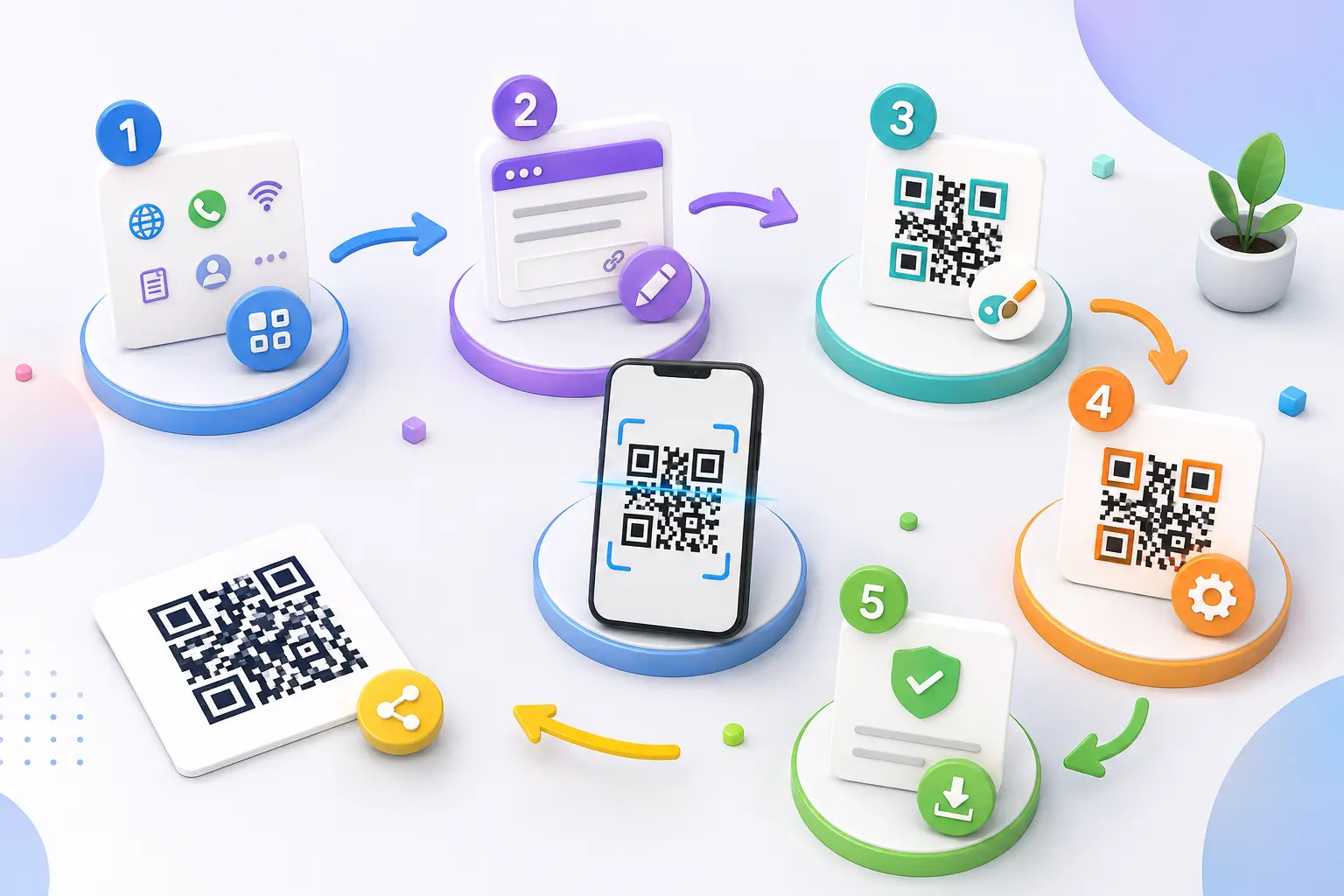
Step 1: Create Your Link Page
First, decide which destinations you want visitors to access. Keep the list focused on links that actually matter to your audience.
Step 2: Add Your Links
Depending on the platform, you may be able to add:
- Website
- Social media
- Phone number
- Payment link
- Product page
- Event registration page
Step 3: Customize the Page
Add a recognizable title, profile image or logo, and a simple visual style. Make sure the page works well on smartphones because most QR scans happen on mobile devices.
Step 4: Generate the QR Code
The platform creates one QR code connected to your multi-link page.
Step 5: Test Before Sharing
Scan the QR code using multiple phones and check every important link. This simple step can prevent broken links from appearing on printed marketing material.
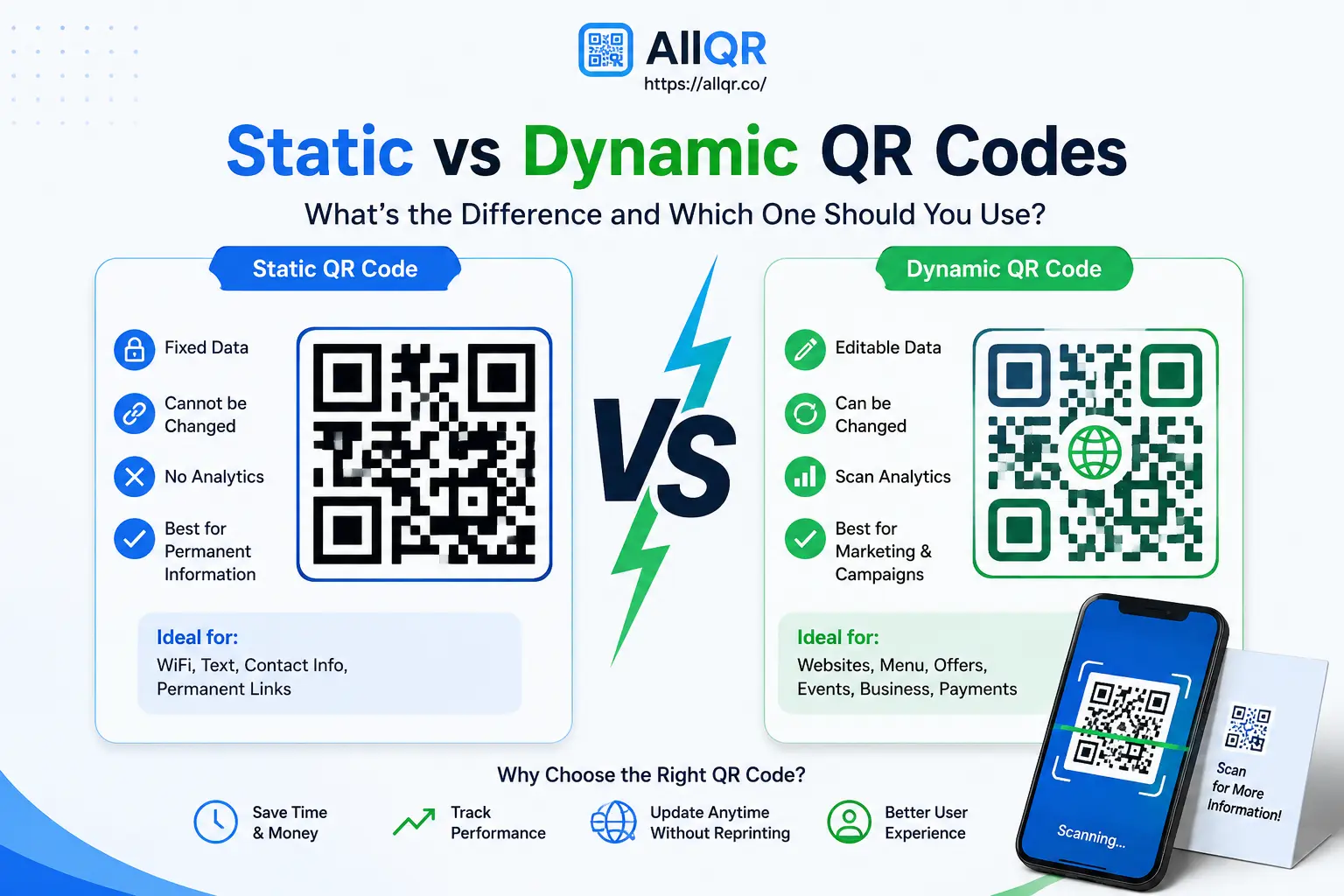
Static vs Dynamic Multi-Link QR Codes
One of the most important decisions is whether to use a static or dynamic QR code.
| Feature | Static QR | Dynamic QR |
|---|---|---|
| Destination changes | Usually not possible | Possible |
| Requires reprinting after changes | Often yes | Usually no |
| Scan analytics | Limited or unavailable | Available on supported platforms |
| Best for | Fixed information | Marketing campaigns |
| Long-term flexibility | Low | High |
A static QR code is useful when the destination will remain unchanged. For example, a permanent contact page may not need frequent updates.
A dynamic QR code is more suitable for campaigns where links, landing-page content, or destinations may change over time. You can learn more about this approach through a dynamic QR code generator.
The key advantage is that the printed QR does not necessarily need to change when the destination behind it is updated.
Where Can You Use a QR Code for Multiple Links?
Multi-link QR codes work particularly well in situations where space is limited but several digital destinations are relevant.
Business Cards
A business card can contain one QR code that opens a page with your website, phone number, email, LinkedIn profile, portfolio, and other professional links.
This avoids filling the card with long URLs.
Restaurants and Cafés
A restaurant could connect customers to:
- Digital menu
- WhatsApp ordering
- Google Maps
- Reservation page
- Website
The same QR can be placed on tables, takeaway packaging, or printed menus.
Events
Event organizers can use a QR code to provide access to:
- Registration
- Event schedule
- Venue location
- Speaker information
- Social media
- Contact details
This can be particularly useful when event information changes during the campaign.
Creators and Influencers
Creators often have multiple destinations competing for attention. One QR can bring together Instagram, YouTube, website, store, newsletter, portfolio, and other relevant pages.
Retail and Product Packaging
A product package could use one QR code to connect customers with product information, support, warranty registration, social profiles, and the company's website.
What Makes a Good Multi-Link QR Code?
Creating a QR code is easy. Creating one that people actually use requires some thought.
Keep the Landing Page Simple
Avoid overwhelming visitors with dozens of buttons. Put the most important destination first and organize the rest logically.
Use Clear Link Names
Instead of:
Click Here
Use:
Visit Our Website
Chat on WhatsApp
View Instagram
Download Product Guide
Clear labels tell users what they will get before they click.
Make It Mobile-Friendly
A QR scan usually happens on a smartphone. The landing page should load quickly, have readable text, and use buttons that are easy to tap.
Maintain QR Contrast
Highly decorative QR codes can become difficult to scan. If you customize colors or add a logo, test the final code from different distances and lighting conditions.
Test Before Printing
Always test the final QR code after downloading it and before sending it to print.
Check:
- Does the QR scan correctly?
- Does the landing page load?
- Do all important links work?
- Does it look correct on mobile?
- Is the QR still readable after printing?
How Businesses Can Track Multi-Link QR Performance
For marketing campaigns, simply knowing that a QR code exists is not enough. Businesses often want to understand whether people are actually using it.
Depending on the QR platform, analytics may provide information such as:
- Number of scans
- Scan trends over time
- Device information
- Location-related data
- Campaign performance
These insights can help businesses understand which campaigns attract attention and when users interact with their QR codes.
For example, a restaurant could compare scans from table cards against scans from takeaway packaging. A retailer could compare QR engagement between two different campaigns.
Analytics should be interpreted carefully. A scan does not automatically mean a sale or conversion, so QR data works best when considered alongside other marketing metrics.
Multi-Link QR Code vs Single-Link QR Code
The right format depends on what you are trying to accomplish.
| Use Case | Single-Link QR | Multi-Link QR |
|---|---|---|
| One website page | ✅ | Optional |
| Multiple social profiles | Limited | ✅ |
| Business card | Good | Excellent |
| Restaurant information | Good | Excellent |
| Event information | Good | Excellent |
| Multiple marketing destinations | Limited | ✅ |
| Simple fixed destination | ✅ | Optional |
| Flexible digital presence | Limited | ✅ |
A single-link QR is often better when there is only one clear destination.
A multi-link QR makes more sense when users need several related destinations from the same printed or digital asset.
Common Mistakes to Avoid
Even a well-designed QR campaign can perform poorly if the landing experience is not considered.
Too Many Links
Adding every possible social profile can make the page difficult to use. Include destinations that are genuinely relevant.
Poor Mobile Design
A page that looks good on desktop but is difficult to use on a phone can lose visitors quickly.
Low-Contrast QR Design
Avoid reducing the contrast between the QR pattern and background just for visual styling.
Broken or Outdated Links
Review important links regularly, especially for campaigns that remain active for months.
No Testing
Never assume a QR code works because it was generated successfully. Scan the final version yourself.
Ignoring Analytics
If the QR is being used for marketing, tracking can provide useful information about campaign engagement.
How to Create a QR Code for Multiple Links
A typical workflow looks like this:
- Choose a multi-link or All-in-One QR solution.
- Create the landing page.
- Add your important destinations.
- Add branding and customize the page.
- Generate the QR code.
- Test it on multiple devices.
- Download the QR code.
- Add it to your marketing material.
- Monitor performance if analytics are available.
- Update the destination page when required.
For example, an All-in-One QR page can combine social profiles, contact information, websites, and other useful destinations into one mobile-friendly experience.
If your campaign also requires shorter URLs, a URL shortener can be useful for sharing and managing individual links separately.
Tips for Better QR Campaign Results
A few practical improvements can make a noticeable difference:
- Add a clear “Scan to Explore” or “Scan to Connect” call to action.
- Keep the QR large enough to scan comfortably.
- Leave adequate white space around the QR pattern.
- Use a short, useful list of destinations.
- Test the code before printing thousands of copies.
- Keep the landing page fast and mobile-friendly.
- Review links regularly.
- Use analytics when measuring campaign performance.
- Match the landing page branding with the printed material.
The goal is not to make the QR code complicated. The goal is to make the next step obvious.
Frequently Asked Questions
1.What is a QR code for multiple links?
A QR code for multiple links opens a landing page containing several destinations instead of sending users to only one URL. It can include websites, social media profiles, WhatsApp, payment pages, contact information, and other relevant links.
2.Can I update links after creating a multi-link QR code?
Yes, when the QR code uses a dynamic destination. You can update the links on the associated landing page without necessarily replacing the printed QR code.
3.Where can I use a multi-link QR code?
You can use one on business cards, packaging, posters, restaurant tables, event materials, brochures, product displays, and other offline marketing assets.
4.Is a multi-link QR code better than a normal QR code?
Neither is automatically better. A single-link QR code is ideal when users need one specific destination, while a multi-link QR code is more useful when several related destinations need to be shared from one QR code.
Conclusion
A QR code for multiple links provides a practical way to connect one physical or digital touchpoint with several online destinations. Instead of asking people to remember or type multiple URLs, you can give them one QR code and a clear mobile-friendly page.
The best results come from keeping the experience simple: choose relevant links, use a readable QR design, optimize the landing page for mobile users, test everything before publishing, and use analytics when you need to measure campaign performance.
For businesses, creators, restaurants, and event organizers, a well-planned multi-link QR code can make sharing digital information much easier without adding unnecessary complexity.