Introduction
Have you ever wanted to share a website, WiFi password, PDF, or WhatsApp number without asking people to type long links?
That's exactly where QR codes help.
A QR code lets anyone scan with their smartphone and instantly access your information. Whether you're a business owner, freelancer, student, or marketer, QR codes save time and make sharing information much easier.
The best part is that you no longer need complicated software or technical skills. With AllQR, you can create professional QR codes in just a few clicks—without signing up.
In this guide, you'll learn what a QR code generator is, how it works, different QR code types, and how businesses use QR codes to improve customer engagement.
What Is a QR Code Generator?
A QR code generator is an online tool that converts digital information into a scannable QR code.
Instead of typing information manually, users simply scan the QR code with their smartphone camera.
You can create QR codes for:
- Website URLs
- PDFs
- WiFi passwords
- WhatsApp chats
- Contact cards
- Google Reviews
- Instagram profiles
- Digital payments
- Event registrations
Modern tools like AllQR also allow you to customize QR codes by adding brand colors, frames, and logos.
Benefits of Using a Free QR Code Generator
Share Information Instantly
Instead of sending long links, users scan a QR code and access the information immediately.
No Signup Required
Many people simply want to create one QR code without creating an account.
A free QR code generator without signup makes the process faster and more convenient.
Better Customer Experience
Customers don't need to search or type.
They simply scan and continue.
This small improvement makes interactions smoother.
Professional Branding
Adding your company logo and brand colors creates a more professional appearance and improves customer trust.
Perfect for Marketing
Businesses use QR codes on:
- Product packaging
- Business cards
- Flyers
- Posters
- Menus
- Advertisements
- Store displays
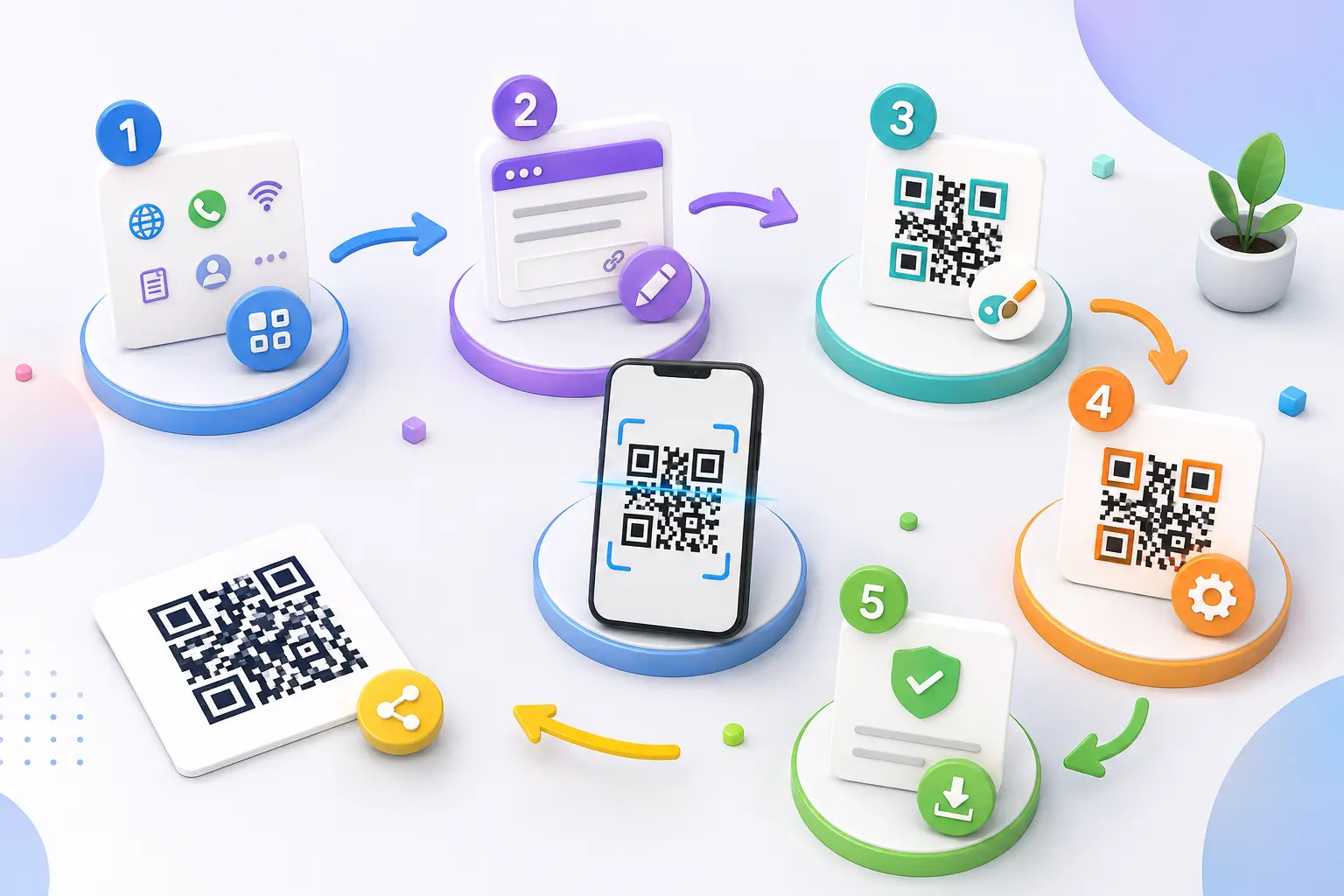
How to Create a QR Code in 5 Simple Steps
Creating a QR code takes less than a minute.
Step 1
Visit AllQR.
Step 2
Choose the QR code type.
For example:
- Website
- WiFi
- Digital Business Card
- UPI Payment
Step 3
Enter your information.
Step 4
Customize your QR code by changing colors or adding your logo.
Step 5
Download your QR code and test it before sharing.
Types of QR Codes You Can Create
Website QR Code
Perfect for blogs, portfolios, landing pages, and online stores.
WhatsApp QR Code
Allow customers to start a WhatsApp chat instantly.
Great for:
- Customer support
- Sales
- Bookings
WiFi QR Code
Let visitors connect without typing passwords.
Ideal for:
- Hotels
- Cafés
- Offices
- Homes
Instagram QR Code
Grow your followers by printing QR codes on:
- Business cards
- Packaging
- Posters
- Event banners
PDF QR Code
Share:
- Menus
- Catalogues
- Brochures
- Product manuals
- Reports
Google Review QR Code
Help happy customers leave reviews in seconds.
Digital Business Card
Share your contact details instantly without printing multiple cards.
UPI Payment QR Code
Accept payments using:
- Google Pay
- PhonePe
- Paytm
- BHIM UPI
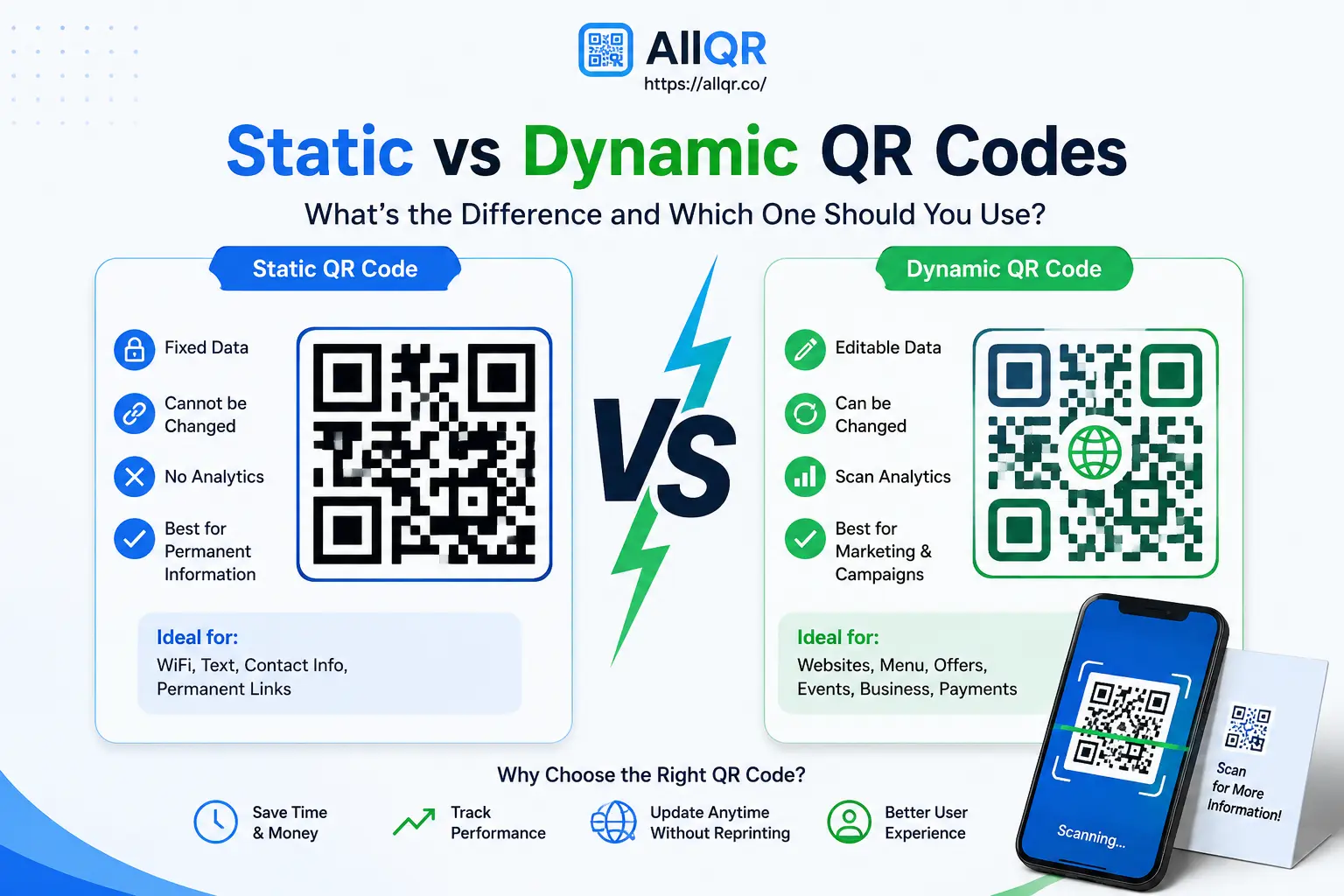
Static vs Dynamic QR Codes
| Static QR Code | Dynamic QR Code |
|---|---|
| Cannot be edited | Can be edited anytime |
| Best for permanent content | Best for marketing campaigns |
| No scan tracking | Includes scan analytics |
| Free forever | Advanced features available |
Best URL Shortener with QR Codes
Using a short branded link together with a QR code creates a cleaner and more professional experience.
Benefits include:
- Better click tracking
- Improved marketing campaigns
- Cleaner printed materials
- Stronger brand recognition
Real-Life Uses of QR Codes
Businesses
- Product packaging
- Google Reviews
- Marketing campaigns
- Store promotions
Restaurants
- Digital menus
- Online ordering
- Payment collection
Education
- Attendance
- Study materials
- Assignment sharing
Events
- Registration
- Digital tickets
- Visitor check-in
Personal Use
- Wedding invitations
- Portfolio sharing
- Resume
- Social profiles
Common Mistakes to Avoid
Avoid these mistakes:
❌ Blurry QR codes
❌ Tiny QR codes
❌ Low contrast colors
❌ Broken links
❌ Not testing before printing
Why QR Codes Matter in 2026
QR codes have become an essential part of digital communication.
From contactless payments and smart marketing to customer support and online sharing, businesses are using QR codes to simplify interactions and improve engagement.
As smartphones continue to make QR scanning easier, businesses that adopt QR technology today will be better prepared for tomorrow's digital experiences.
Frequently Asked Questions (FAQ)
1. What is a free QR code generator?
A free QR code generator is an online tool that lets you create QR codes for websites, PDFs, WiFi, contact details, and more without paying. Simply enter your information, generate the QR code, and download it for personal or business use.
2. Can I create a QR code without signing up?
Yes. Many QR code platforms, including AllQR, allow you to create QR codes without creating an account. This makes the process faster and more convenient for users who need a QR code quickly.
3. What can I use a QR code for?
QR codes can be used for many purposes, including sharing website links, WhatsApp chats, PDFs, WiFi passwords, Google Reviews, digital business cards, social media profiles, and payment information.
4. Are QR codes safe to use?
Yes, QR codes are safe when they are created by trusted sources and link to secure websites. Before scanning any unknown QR code, it's always a good idea to check that it comes from a reliable source.
5. Which is the best free QR code generator?
The best QR code generator is one that is easy to use, creates high-quality QR codes, and supports different QR code types. AllQR lets you create QR codes for websites, PDFs, WiFi, WhatsApp, digital payments, and more in just a few clicks.
Conclusion
QR codes have become one of the simplest ways to connect the physical and digital worlds. Whether you're sharing a website, accepting digital payments, promoting your Instagram profile, or providing WiFi access, a QR code makes the experience faster and more convenient.
With AllQR, you can create free QR codes without signup, customize them with your brand, and generate QR codes for websites, PDFs, WhatsApp, WiFi, Google Reviews, digital business cards, and more—all from one easy-to-use platform.
Start creating smarter QR codes today and make it easier for people to connect with your business in just one scan.