Introduction
If you have an Instagram profile, Facebook page, YouTube channel, LinkedIn profile, WhatsApp, website, or online store, sharing every link separately can quickly become inconvenient.
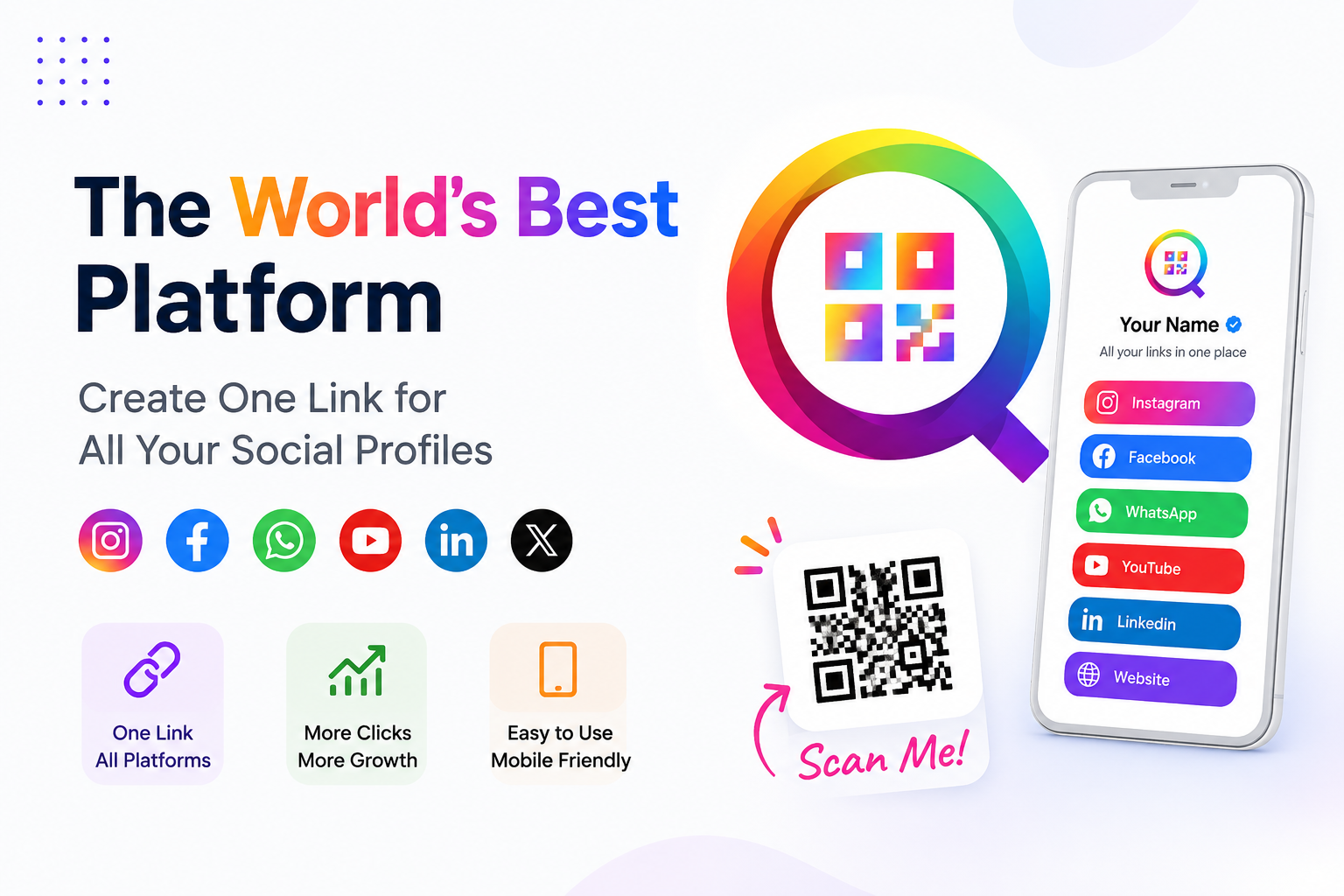
A single link for all your social media profiles gives people one place to find everything about you. Instead of sharing multiple URLs, you can create a simple page that brings your social profiles, website, contact details, and other important links together.
With AllQR, creators, freelancers, professionals, and businesses can organize their online presence into one shareable page. For example, a photographer can include their Instagram, portfolio, WhatsApp, booking page, YouTube channel, and location—all behind one link.
This makes it easier for people to discover your content, contact you, and connect with your brand without searching across different platforms.
Why Do You Need One Link for All Social Media Profiles?
Think about an Instagram bio.
You have limited space, but you may want your followers to visit several places:
- YouTube
- Website
- Online store
- Portfolio
- Booking page
Sending people eight different URLs isn't a great experience.
A social media link in bio page solves this by giving visitors one destination where they can choose what they want.
A simple example
Imagine you're a freelance graphic designer.
Someone discovers your work on Instagram and wants to hire you. Instead of sending them separate messages with your portfolio, WhatsApp, LinkedIn, and booking link, you can simply share:
allqr.co/yourname
When they open it, they might see:
View Portfolio
Book a Consultation
WhatsApp Me
LinkedIn
Instagram
Email Me
That's much easier for both you and your visitor.
What Is a One-Link Social Media Page?
A one-link social media page is a simple landing page that collects multiple online destinations under a single URL.
It is sometimes called:
- Link-in-bio page
- Bio link
- Social media link page
- Smart link page
- Multi-link page
- Social media link generator
Instead of creating a complicated website just to share your important links, you can use one lightweight page designed specifically for quick access.
This is particularly useful for people who promote themselves through Instagram, TikTok, YouTube, Facebook, LinkedIn, WhatsApp, and other social platforms.
How AllQR Helps You Create One Smart Link
With AllQR, you can create a personalized page and add the links that matter to you.
You can include:
- YouTube
- Telegram
- TikTok
- X
- Website
- Blog
- Portfolio
- Online store
- Booking page
- Payment link
The idea is simple: one link, multiple destinations.
You can also customize your page with your name, profile image, logo, colors, descriptions, and other branding elements.
This makes the page feel more connected to your personal brand or business instead of looking like a random list of URLs.
One Link for Creators and Influencers
Creators often have content spread across several platforms.
For example, a YouTube creator may also have:
- Instagram Reels
- TikTok videos
- YouTube Shorts
- A newsletter
- Affiliate links
- An online course
- Merchandise
- A community
Instead of choosing only one destination to promote, a link-in-bio page lets the creator put everything in one place.
Example
A fitness creator could create a page like:
My Latest Workout →
YouTube Channel →
Join My WhatsApp Community →
Training Program →
Instagram →
Book a Personal Session →
Now the creator only needs to promote one link across their social profiles.
One Link for Small Businesses
This isn't just useful for influencers.
Small businesses can use a social media link generator to make it easier for customers to find important information.
Example: A restaurant
A restaurant could create one page containing:
View Menu
Order on WhatsApp
Book a Table
Get Directions
Instagram
Facebook
Customer Reviews
Instead of making customers search through the website or different social profiles, everything is available from one page.
The same approach can work for salons, gyms, photographers, clothing stores, agencies, consultants, restaurants, clinics, and local businesses.
Why a Mobile-Friendly Link Page Matters
Most people discovering a social media link are likely to be using a smartphone.
That means your page needs to work well on smaller screens.
A good link page should have:
- Fast loading
- Clear buttons
- Easy navigation
- Readable text
- Simple design
- Mobile-friendly layouts
Visitors shouldn't need to zoom in, search through menus, or wait for a complicated page to load.
For example, if someone scans a QR code on a business card, they should immediately understand where to click.
Good user experience isn't about adding more features. It's about making the next action obvious.
Use Your Smart Link Offline With a QR Code
One of the useful things about combining a smart link and QR code is that your online profile can also be shared offline.
For example, a photographer can print:
Scan to View My Portfolio
on a business card.
The QR code opens their AllQR page, where visitors can access the portfolio, WhatsApp, Instagram, booking page, and website.
Businesses can use the same idea on:
- Business cards
- Product packaging
- Restaurant tables
- Posters
- Flyers
- Event materials
- Brochures
- Store displays
This creates a simple connection between offline marketing and your online presence.
Make Your Link Page Match Your Brand
Your link page is part of your digital identity.
If you're a business, you may want your page to use your brand logo, colors, and style.
If you're a creator, you might prefer a more personal design with your profile photo, introduction, and featured content.
A professional page can include:
- Logo or profile photo
- Brand name
- Short introduction
- Custom colors
- Social icons
- Featured links
- Contact information
- Call-to-action buttons
For example:
Riya Photography
Wedding & Portrait Photographer
📸 View Portfolio
📅 Book a Session
💬 WhatsApp
📍 Studio Location
📷 Instagram
That's more useful than simply displaying a long list of URLs.
One Link Can Make Sharing Easier
The biggest benefit of a one link for all social media profiles is convenience.
Your audience doesn't have to remember multiple URLs.
You don't have to repeatedly send individual links.
And if you add a new platform later, you can update your page without changing the main link you've already shared.
For example, suppose you start a YouTube channel six months after creating your AllQR page.
Instead of changing the link on your business cards, Instagram bio, email signature, and advertisements, you can simply add YouTube to the existing page.
The main link stays the same.
Who Can Use a Social Media Link-in-Bio Page?
A multi-link page can be useful for almost anyone with multiple online destinations.
1.Creators
Promote videos, social profiles, products, and communities.
2.Freelancers
Connect portfolios, services, contact details, and booking pages.
3.Businesses
Bring websites, stores, WhatsApp, social profiles, and customer support together.
4.Photographers
Share portfolios, galleries, booking pages, and social accounts.
5.Restaurants
Share menus, ordering options, locations, and social profiles.
6.Agencies
Showcase services, case studies, contact details, and social channels.
7.Professionals
Connect LinkedIn, portfolio, email, website, and appointment links.
Frequently Asked Questions
1.What is a one link for all social media profiles?
It is a single URL that opens a page containing multiple social media profiles, websites, contact links, and other important destinations.
2.Is a link-in-bio page useful for businesses?
Yes. Businesses can use it to connect customers with websites, WhatsApp, product pages, booking forms, locations, social profiles, and other important resources.
3.Can I add WhatsApp to my social media link page?
Yes. You can add a WhatsApp link so visitors can contact you directly from your page.
4.Can I use a QR code with my bio link?
Yes. A QR code can direct visitors to your link-in-bio page, making it useful for business cards, packaging, posters, events, and printed marketing materials.
5.Can I add multiple social media accounts?
Yes. You can organize multiple social profiles and other important links on the same page.
6.Is a link-in-bio page better than sharing individual links?
For people with multiple online destinations, it can provide a simpler experience because visitors only need to remember and open one URL.
Conclusion
Your audience shouldn't have to search across different platforms to find you.
Whether you're a creator promoting your latest video, a freelancer sharing your portfolio, or a business connecting customers with WhatsApp and your website, one smart link can bring everything together.
The goal isn't simply to have more links. It's to make those links easier to find and easier to use.
With a well-organized link-in-bio page, you can create one central place for your social profiles, website, contact information, products, bookings, and other important destinations.
One link. One simple page. Everything your audience needs.
For ALLQR, I recommend targeting “one link for all social media profiles” as the primary keyword naturally, with supporting terms such as link in bio, social media link page, bio link, smart link, multi-link page, and social media link generator rather than repeatedly forcing the exact-match keyword.