Introduction
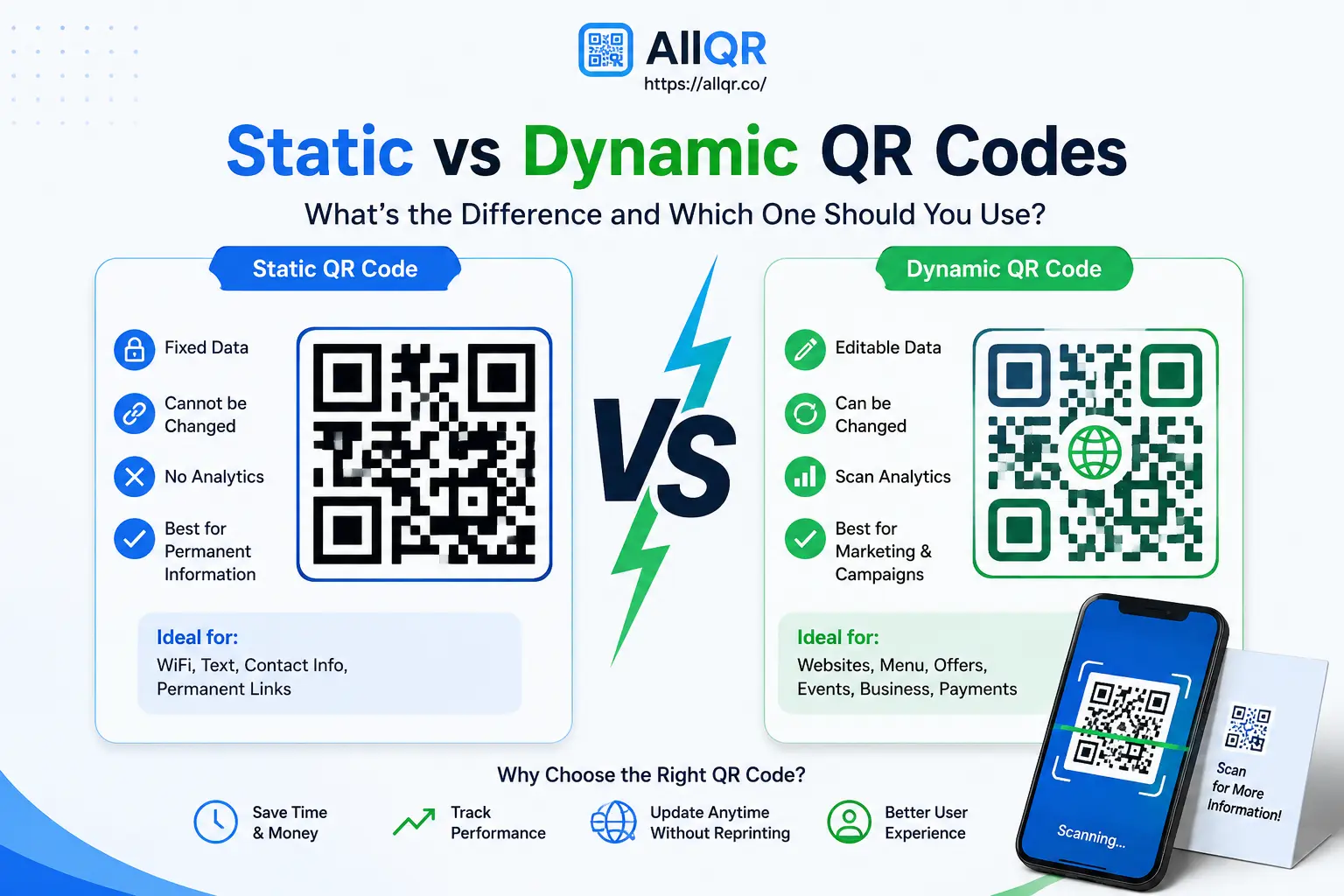
Not all QR codes work the same way. Static QR codes are best for information that stays unchanged, while dynamic QR codes offer flexibility to update destinations and track scans.
In this guide, we’ll compare static vs dynamic QR codes, their key differences, use cases, and which type is best for your business, marketing, menu, or personal needs.
What Is a Static QR Code?
A static QR code stores the information directly in the code.
Once it has been created, the information cannot normally be changed without generating a new QR code.
For example, suppose you're creating a QR code containing a permanent contact number. If that information stays the same, a static QR code can be a simple solution.
Common Uses of Static QR Codes
Static QR codes work well for information that rarely changes, such as:
- Contact information
- WiFi details
- Permanent text
- Basic website links
- Product identification
- Simple personal projects
The main advantage is simplicity. Once created, the QR code doesn't depend on a dashboard to change its stored information.
What Is a Dynamic QR Code?
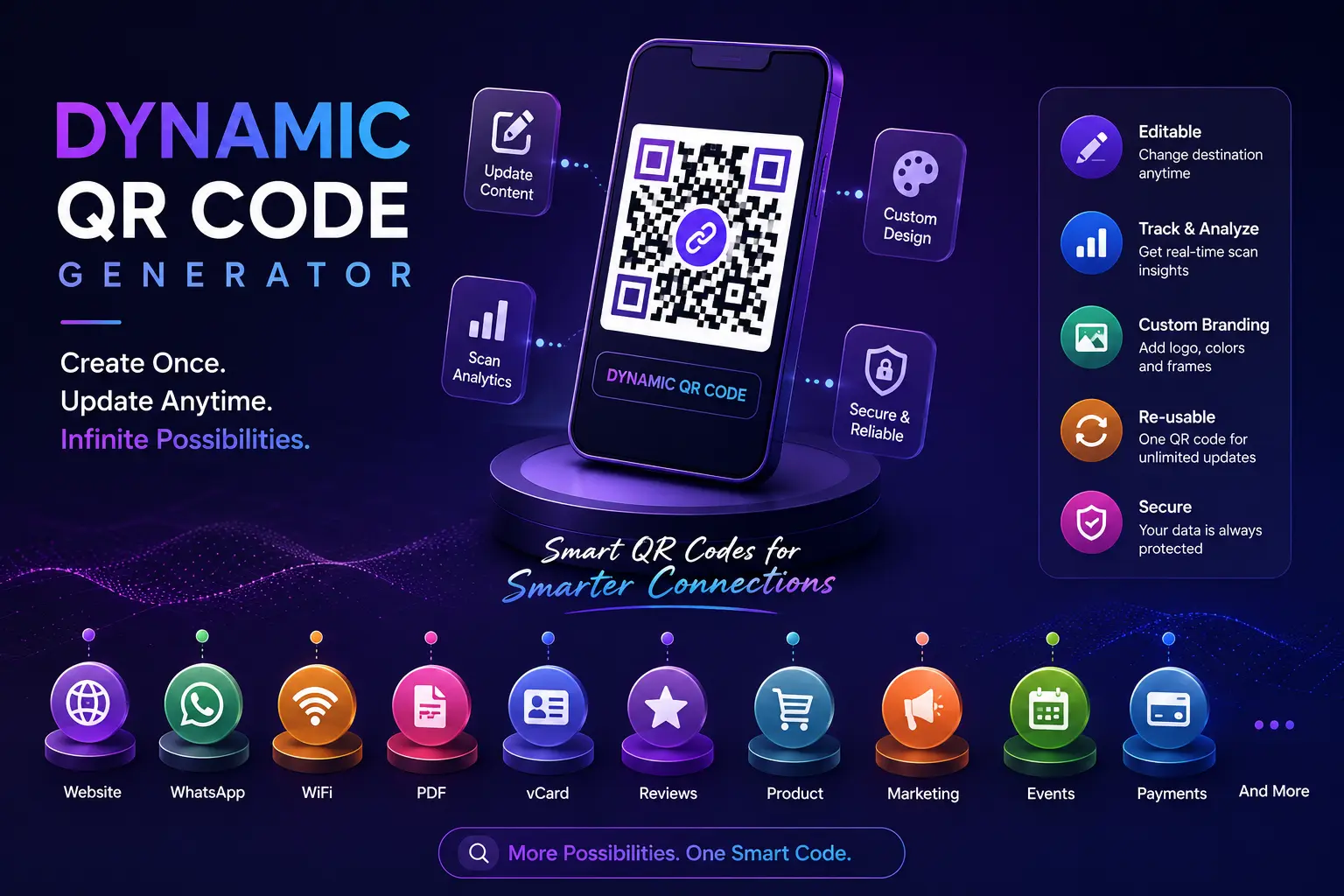
A dynamic QR code uses a destination or redirect that can be managed after the QR code has been created.
This means you can change the destination without replacing the printed QR code.
For example, a restaurant could print one QR code on every table. During one month, it could point to the regular menu. Later, the restaurant could update the destination to a seasonal menu while keeping the same printed QR code.
In practice, the biggest difference becomes noticeable after a QR code has already been printed. If the destination changes later, a dynamic QR code can save the business from replacing printed cards, posters, or table displays
This flexibility is one of the main reasons businesses use a Dynamic QR Code Generator.
Common Uses of Dynamic QR Codes
Dynamic QR codes are particularly useful for:
- Marketing campaigns
- Restaurant menus
- Product packaging
- Event information
- Business promotions
- Digital business cards
- Customer feedback
- Website campaigns
Depending on the platform and plan, dynamic QR solutions may also provide scan analytics.
Static vs Dynamic QR Codes: Quick Comparison
| Feature | Static QR Code | Dynamic QR Code |
|---|---|---|
| Change destination | ❌ Usually requires a new QR | ✅ Can be updated |
| Printed QR can be reused | Limited | ✅ Yes |
| Scan analytics | Usually unavailable | Often available |
| Best for | Permanent information | Changing content |
| Marketing campaigns | Basic | ✅ Better suited |
| Content updates | Create a new QR | Update destination |
| Long-term flexibility | Limited | High |
The important difference isn't simply that one is "better." The right choice depends on what you're trying to accomplish.
Key Benefits of Static QR Codes
1. Simple to Create
If you only need a basic QR code, static generation is straightforward.
2. Good for Permanent Information
A static QR code can be useful when the information isn't expected to change.
3. Useful for Personal Projects
For a contact card, permanent text, or simple information sharing, a static QR code may be all you need.
4. No Ongoing Content Management
Once created, there's generally nothing else to manage if the encoded information remains valid.
Key Benefits of Dynamic QR Codes
1. Change the Destination
This is the biggest practical benefit.
If your website, menu, campaign, or landing page changes, you can update the destination instead of replacing every printed QR code.
2. Reduce Reprinting
Businesses often print QR codes on thousands of physical materials.
Dynamic QR codes can reduce the need to replace those materials whenever the linked content changes.
3. Track Scans
Many dynamic QR code services provide analytics.
Depending on the service, you may be able to see information such as scan counts, dates, devices, or general location.
This can help marketers understand whether an offline campaign is generating engagement.
4. Support Marketing Campaigns
Suppose a retail store runs different offers throughout the year.
The same QR code can potentially be used across posters and displays while the destination changes for each campaign.
5. Better Long-Term Flexibility
Dynamic QR codes are particularly useful when you don't know whether the destination will remain the same for months or years.
Real-World Example: Restaurant Menu
Consider a restaurant that prints a QR code on 100 tables.
With a static QR code, the restaurant might need a new code if the encoded destination needs to change.
With a dynamic QR code, the restaurant can keep the same printed code and update where it sends customers.
This is a small change operationally, but it can save time when the QR code is already printed across many locations.
For example, a restaurant can keep the same QR code on its tables while changing the linked menu for breakfast, lunch, or seasonal offers. This means the restaurant doesn't need to replace every table card whenever the menu changes.
Real-World Example: Marketing Campaign
A company prints QR codes on a promotional flyer.
The first campaign sends visitors to a product page.
After the campaign ends, the company wants to promote another offer.
With a dynamic QR code, the destination can be changed without redesigning and reprinting the original flyer, provided the service supports that functionality.
This also makes campaign management easier.
Which QR Code Should You Choose?
Use a static QR code when:
- Your information is unlikely to change.
- You need a simple QR code.
- You don't need scan analytics.
- You're sharing permanent information.
Choose a dynamic QR code when:
- Your destination may change.
- You're printing thousands of QR codes.
- You want scan analytics.
- You're running marketing campaigns.
- You regularly update menus or promotions.
- You want more control after publishing the QR code.
A useful rule is:
If you expect the information to change, consider dynamic. If it will remain permanent, static may be enough.
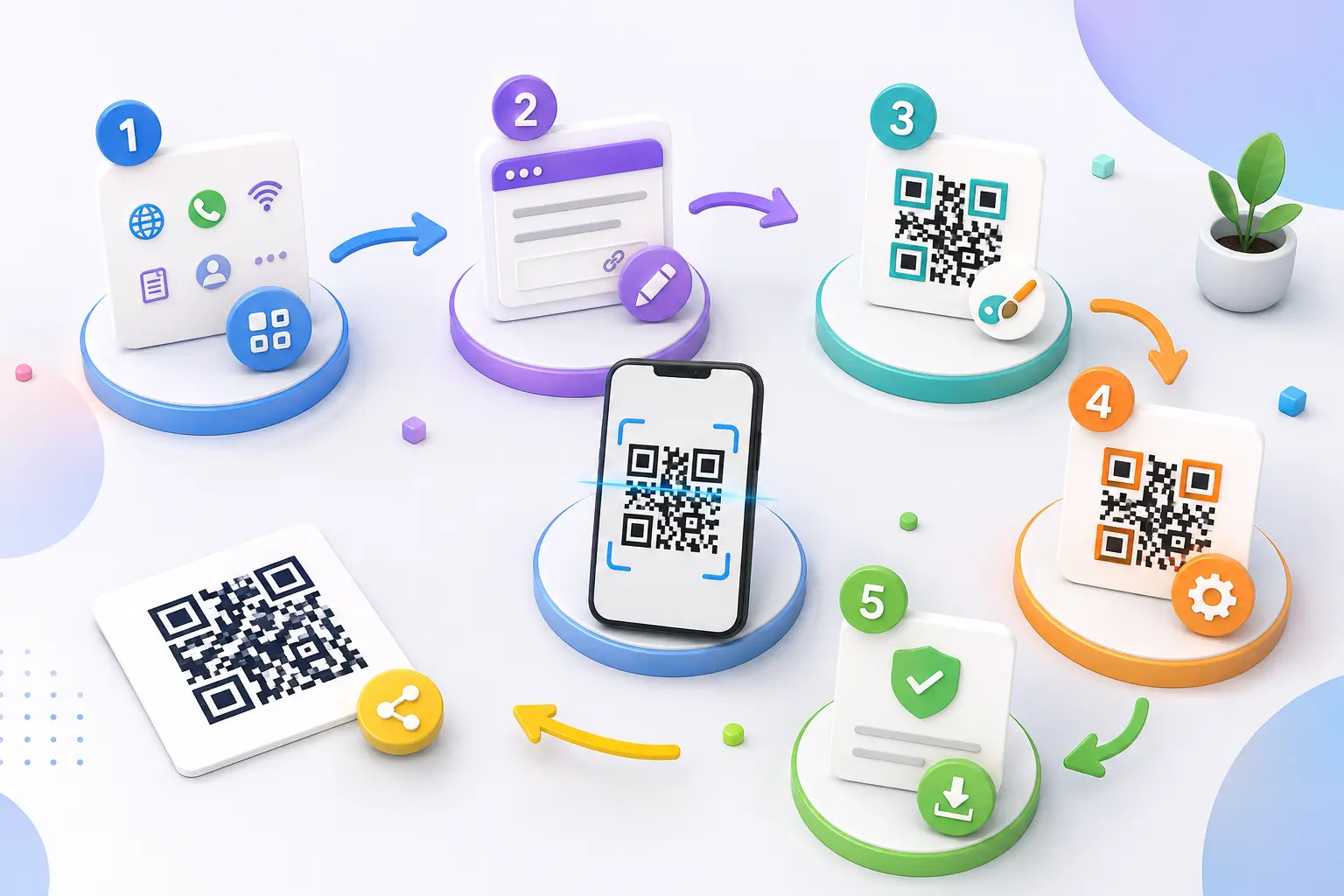
How to Create a Dynamic QR Code
If you decide that a dynamic QR code is the better option, the process is usually straightforward.
Step 1: Choose a Dynamic QR Code Generator
Use a reliable platform such as AllQR to create and manage your QR code.
Step 2: Select Your QR Code Type
Depending on your use case, you may choose:
- Website
- WiFi
- Digital Business Card
- Google Reviews
- Other supported content
Step 3: Add Your Destination
Enter the webpage, document, or other information you want people to access.
Step 4: Customize the Design
If supported, you can add branding elements such as:
- Logo
- Brand colors
- Frame
- Call-to-action text
Step 5: Generate and Test
Scan the QR code with a phone before printing it.
Testing is important. A QR code that looks good but opens the wrong page creates a poor user experience.
Tips for Using Dynamic QR Codes
Test Before Printing
Always test the code on multiple smartphones.
Keep the Destination Useful
Don't send visitors to a page that is difficult to navigate on mobile.
Use a Clear Call to Action
Instead of displaying only a QR code, add text such as:
Scan to View Menu
or
Scan to Get the Offer
Keep the QR Code Easy to Scan
Avoid excessive decoration that interferes with the code's readability.
Check Your Analytics
If your dynamic QR service provides analytics, review the data regularly to understand campaign performance.
Common Mistakes to Avoid
Using Static QR for Frequently Changing Content
If you know the destination will change regularly, static QR codes can create unnecessary replacement work.
Printing Without Testing
Always scan the final version before distributing it.
Making the QR Code Too Small
A QR code needs to be large enough for the intended scanning distance.
Poor Contrast
Use sufficient contrast between the QR code and its background.
Forgetting About Mobile Experience
A QR code may scan perfectly, but the destination page should also work well on mobile devices.
Quick Answer
What is the difference between static and dynamic QR codes?
A static QR code stores its information directly and generally cannot be edited after creation. A dynamic QR code uses a manageable destination, allowing the linked content to be updated without replacing the printed QR code. Dynamic QR codes are therefore better suited to businesses, marketing campaigns, menus, and frequently changing content.
Frequently Asked Questions
1. Is a dynamic QR code better than a static QR code?
Not always. Static QR codes are suitable for permanent information, while dynamic QR codes are more useful when you need flexibility, updates, or analytics.
2. Can I change a dynamic QR code after printing?
Yes, when the dynamic QR service supports destination editing. You can update the destination while keeping the same printed QR code.
3. Can I track scans with a dynamic QR code?
Many dynamic QR platforms offer scan analytics. The exact information available depends on the provider and plan.
4. Do static QR codes expire?
A static QR code itself generally doesn't have an expiration date. However, the information it points to can stop working if the website, file, or service is removed.
5. Are dynamic QR codes suitable for businesses?
Yes. They are particularly useful for businesses that frequently update menus, promotions, landing pages, product information, or marketing campaigns.
6. Can I add a logo to a QR code?
Many QR code generators support branding options such as logos, colors, and frames. Always test a customized QR code before publishing it.
7. Which QR code should a restaurant use?
If the restaurant expects its menu or destination to change, a dynamic QR code can provide useful flexibility. For permanent information, a static QR code may be sufficient.
Related QR Code Tools
If you're creating QR codes for different purposes, you can also explore:
- Free QR Code Generator
- Website QR Code Generator
- PDF QR Code Generator
- WiFi QR Code Generator
- UPI QR Code Generator
- WhatsApp QR Code Generator
- Digital Business Card QR Code
- Google Review QR Code
These related tools can help you build a useful internal-link structure around your main QR code topic.
Conclusion
The choice between static and dynamic QR codes comes down to how much flexibility you need.
A static QR code is a practical choice for information that will stay the same. A dynamic QR code is more suitable when you expect changes, want to manage campaigns, or need access to scan analytics.
For businesses, the biggest advantage of a Dynamic QR Code Generator is the ability to keep using the same QR code even when the destination changes. That can be especially valuable for printed menus, packaging, brochures, business cards, and marketing materials.
Before choosing, think about what will happen after you print and publish the QR code, not just what you need today.
If your content is likely to change, explore a dynamic QR solution such as AllQR and choose a QR code setup that gives you the flexibility to grow and update your digital content over time.